The source score lacks playback semantics
Symptom: Repeats, tempo changes, ties, or articulations do not sound as expected.
How to fix it: Correct the MusicXML/Score JSON structure first; audio can only follow the information present in the score.
See the real result first
Load a structured score, hear playback in the browser, change tempo and loop settings, then download a deterministic WAV/MIDI practice example.
Before
A four-note MusicXML score with explicit pitch, rhythm, meter, and tempo context.
Download input caseAfter
Timed playback events and a 3.2-second synthesized WAV practice file; MIDI remains available as an open event format.
Download output caseWhat to inspect
Real downloadable samples
The team created this short test phrase. Each file can be downloaded, parsed, and opened independently in compatible software.
Platform modules
Each feature page maps back to the same score project model rather than a separate one-off converter.
Module
Tone.js playback
Connected to the score project workflow.
Module
Playback timeline
Connected to the score project workflow.
Module
Browser recording Beta
Connected to the score project workflow.
Module
Practice feedback Beta
Connected to the score project workflow.
Module
MIDI export
Connected to the score project workflow.
Module
WAV/MP3 renderer
Connected to the score project workflow.
Real product example
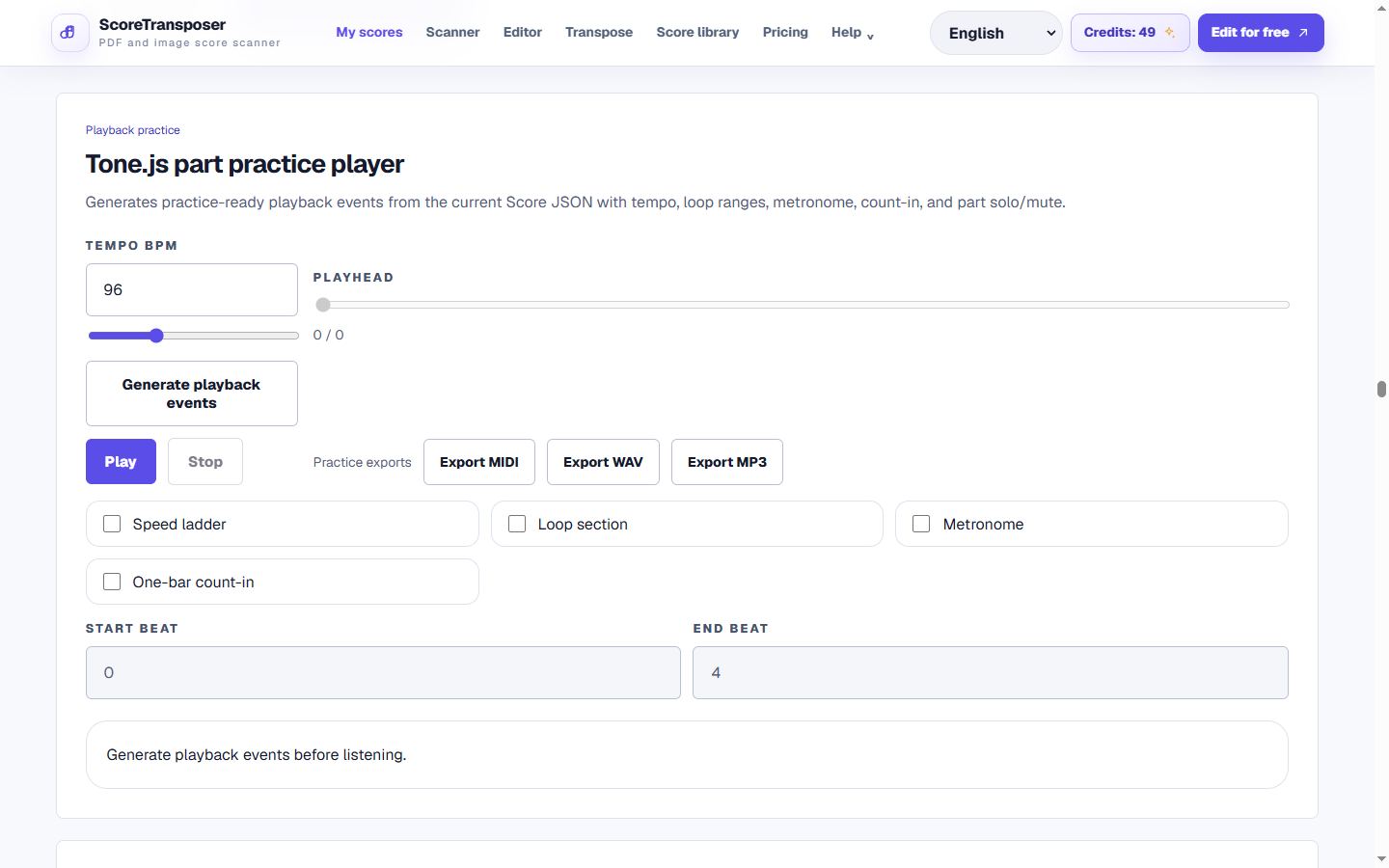
Captured from the product workspace that owns playback and export controls. Captured: Aug 29, 2026.
Output
Browser practice playback plus a deterministic 3.2-second WAV reference; a separate MIDI reference is also availableDownload output caseThe public WAV is a synthetic format reference. Production WAV or MP3 quality depends on FluidSynth, a SoundFont and ffmpeg.
Short product demo
Short product demo: turning a structured score into practice audio
Dedicated practice controls
This public demo uses the same self-authored MusicXML/WAV as the homepage. The full workspace adds measure loops, count-in, part solo/mute, and a Tone.js metronome.
Tempo, loop boundaries, and the metronome live in the URL. Sound always stays muted by default and is never shared.
PDF sheet music playback
A PDF or score image first becomes an OMR candidate. Review the notes, rhythm, key, measures, and parts, then promote the corrected result to MusicXML and Score JSON before playback or MIDI, WAV, or MP3 export. This is not arbitrary PDF text-to-speech or a promise of perfect one-click recognition.
Workflow
The public page leads into the authenticated app workflow when users are ready to process a score.
Generate playback events
The app converts Score JSON into timed note events with tempo, measure markers, dynamics, articulations, ties, and repeat handling.
Practice in the browser
Control tempo, loop ranges, metronome, count-in, solo/mute, and per-part volume. The Beta practice recorder adds reviewable pitch and timing observations for monophonic practice.
Export practice materials
Queue reproducible MIDI, WAV, or MP3 files from an immutable score revision and the current practice settings.
Product detail
Common errors
Symptom: Repeats, tempo changes, ties, or articulations do not sound as expected.
How to fix it: Correct the MusicXML/Score JSON structure first; audio can only follow the information present in the score.
Symptom: The preview timbre differs from the downloaded practice file.
How to fix it: Use preview for timing and practice, then test the actual exported WAV/MP3 before sharing it.
Symptom: Playback works but server-side MP3 export is not offered.
How to fix it: Use the available MIDI/WAV path or confirm that FluidSynth, a SoundFont, and ffmpeg are configured for the environment.
Accuracy statement
Score-to-audio does not recognize a performance; it schedules the structured notes already in the score. Pitch and timing are reproducible for the same revision and settings, while timbre remains synthesized and expressive interpretation is intentionally limited. Incorrect source notation produces incorrect audio.
Workflow comparison
This compares workflow categories, not the overall superiority of any brand. Product scope and capabilities change over time.
| Workflow | Best for | Tradeoff |
|---|---|---|
| ScoreTransposer browser workflow | Connected notation playback, loops, tempo practice, open MIDI, and reusable audio exports. | Synthetic playback is a practice aid, not a human performance. |
| Traditional notation editor playback | Playback while composing and detailed score editing. | Sharing practice variants may require repeated local exports and file management. |
| Audio-to-score transcription tool | Starting from a recording rather than notation. | It solves the opposite problem and introduces recognition uncertainty before playback. |
FAQ
Practical limits and the expected workflow for this score tool.
The app converts Score JSON into timed note events with tempo, measure markers, dynamics, articulations, ties, and repeat handling.
Yes. Successful imports become Score JSON revisions that can be corrected, transposed, played, and exported from the score workspace.
This feature generates audio from structured scores; audio-to-score transcription is available as a separate experimental import path.
You can scan PDF sheet music, review and correct the OMR candidate, and then play the structured score or export MIDI, WAV, or MP3. Recognition quality depends on the source, so the PDF must be checked before relying on the audio.
Related workflows
These pages use the same MusicXML and Score JSON source instead of sending the score through disconnected converters.