Platform modules
Sheet music scanner for printed scores
Module
PDF and photo upload
Upload a complete PDF or a PNG, JPG, WebP or TIFF photo of your score.
Module
Printed music recognition
Recognize printed staff notation so notes and rhythms can be edited.
Module
Editable MusicXML
Keep an editable MusicXML file for use in other notation software.
Module
Correct scanning mistakes
Compare the result with your original and fix misread notes before export.
Real product example
One score, structured input and reusable output
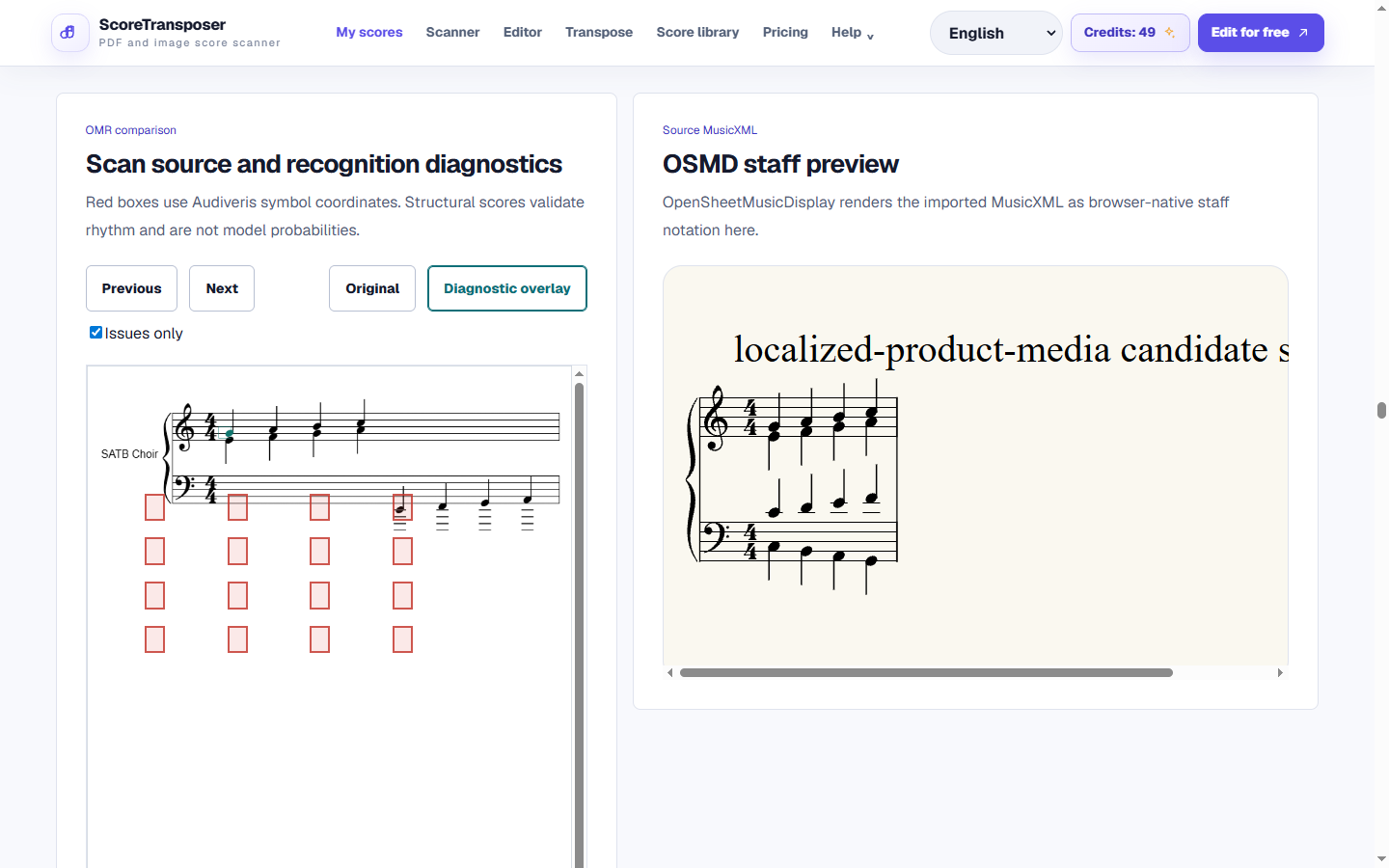
Captured from the product workspace that hosts OMR candidates and correction. Captured: Aug 29, 2026.
Output
Audiveris MusicXML candidate with diagnostics, confidence and editable Score JSONDownload output caseRecognition is an import-and-correct workflow; it is not advertised as universally perfect.
Workflow
Scan sheet music from a PDF
Upload a PDF or image
Sign in and select a complete score PDF or a clear PNG, JPG, WebP or TIFF image. Keep all staff lines and notes visible.
Scan the sheet music
Optical music recognition reads the printed notes and creates an editable score. Follow the progress in the app while the scan is processed.
Review and correct the notes
Compare the recognized score with your source, fix notes and rhythms, and play it back. Then transpose or export the corrected sheet music.
After scanning, use the sheet music editor to correct notes, transpose sheet music for your instrument, or convert sheet music to MIDI. For an editable notation file, follow the PDF to MusicXML guide.
Product detail
Sheet music scanner for phone photos
How accurate is the music scanner?
FAQ
FAQ
Practical limits and the expected workflow for this score tool.
Is the sheet music scanner free?
A free account includes one complete score project, including a multi-page PDF or score image, and 25 credits per month. Keep editing, transposing and playing that score. Eligible server jobs use credits; additional projects and capacity require a paid plan.
Can it scan handwritten sheet music?
The scanner is intended for printed staff notation. Handwritten notes are not reliably supported. For a handwritten score, enter structured Jianpu or use a notation editor to prepare MusicXML instead.
Does it work with phone photos?
Yes, you can upload supported image files from your phone. Photograph the full page in even light, hold the camera parallel to the paper and avoid blur. Check the recognized notes before relying on them.
How long does one page take to scan?
There is no fixed per-page time. Processing depends on image quality, notation complexity, page count and the current queue. The app shows the job status; wait for it to finish before starting another scan of the same file.
Can I fix mistakes after scanning?
Yes. Open the recognized score in the editor, compare it with the original, and change pitches, note lengths, rests and measure settings. Listen to the corrected score before downloading it.
Related workflows
Continue with the same score project
These pages use the same MusicXML and Score JSON source instead of sending the score through disconnected converters.